Fiscal Year
The Fiscal Year option allows users to create a new fiscal year. If the property follows the Gregorian calendar year, but the user wants to change the fiscal year's start month, the fiscal year feature is used. The default values for the start date and end date of a fiscal year are set from January 01st through December 31st. With this feature, users can set up the property's custom fiscal years to fit the property's calendar. As admin user can define a custom fiscal year, and if the user wants to change it, edit the existing fiscal year definition.
Perform the following steps to add a new fiscal year:
Navigate to Settings ➜ All Settings ➜ Property, buildings & outlets (under General).
The default values for the start date and end date of a fiscal year are set from January 01 through December 31 as 12 fiscal periods.
Navigate to the Fiscal Year tab.
Click Add New Fiscal Year. The Add Fiscal Year dialog box appears.
Refer to the following table and fill in the fields to create a new fiscal year:
|
Field |
Description |
|---|---|
|
Fiscal Year Name |
A name for the property's fiscal year settings |
|
Start Date |
The property's start date of a fiscal year. Only the date and month are applicable while setting the start date and end date for a fiscal year. |
|
End Date |
The property's end date of a fiscal year. |
|
Specify Number of Fiscal Periods |
The number of fiscal periods the fiscal year in the property is divided. |
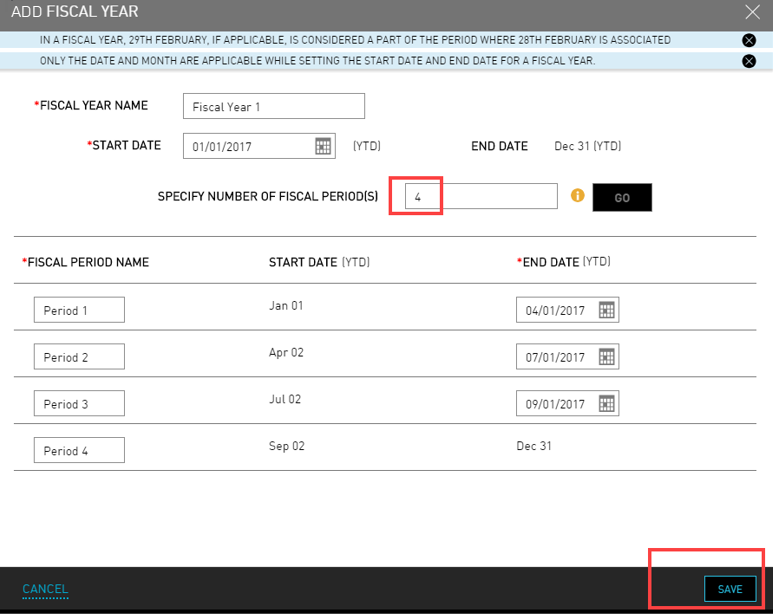
Click Save. The fiscal year details are successfully created.